Security

Install updates
Click cautiously
Use Chrome or Firefox
Backup
Urgent
(Sep 2023) Malicious ads for Google searches are targeting Mac users, says Malwarebytes. The evil sponsored Google ads offer you new application versions -- if you download and install them, you get infected with "Atomic stealer", which tries to copy your keychain and password information.
(Jun 2023) Fraudsters are now using voice synthesizers to generate phone calls that sound linke a loved one claiming they've been kidnaped. Look up "AI Voice Cloning" for many alarming articles. Similarly, "deepfake" videos can be generated showing any person saying anything. Be suspicious.
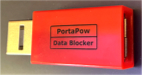
(Apr 2023) Brian Krebs has an article on "Juice Jacking", where an iPhone can be taken over if you plug its charging wire into a hacked public charging kiosk.
Advice: (1) don't plug your phone into sockets you don't trust. (2) if you do, use a "USB condom." Well OK.. how do I decide which sockets can't be trusted? The FBI says to avoid 'airports, hotels, and shopping centers.' And where do I get a "USB condom?" I got my "PortaPow data blocker" from Amazon.
(Mar 2023) The "Emotet" botnet sends you mail that appears to reply to email conversations you have had with someone you know (whose computer got hacked). It includes a Word document that says it is protected and you have to click a button.. but that button enables Word Macros that infect your computer, and can steal passwords, spy on your mail, or install ransomware.
(Aug 2022) Recent email scams send you mail that appears to be from PayPal about an invoice, or from Geek Squad about something you didn't order. These are scams.
(Jul 2022) I am being flooded with "phishing" mail and text messages saying crap like
- Your email/facebook/paypal/... account is locked or bouncing
- There was unusual activity on your credit card
- Your email is locked or bouncing
- Request for partnership
- Your order is confirmed
- etc etc
All of these are fake. They want you to click on something, or download and install something, or tell them your credit card number. Don't.
(Nov 2021) The "Zelle scam" starts with a fake "fraud alert" text message from a bank, as reported by Brian Krebs. If the user replies, they then get a phone call from a scammer pretending to be the bank, with fake caller ID. The scammer asks the user for their online banking ID, and to read back a one-time code sent to their phone. The scammer uses the code to change the user's online banking password using the bank's "lost password" feature, and then drains their account.
(Sep 2021) A friend got hacked. Started with a phone call saying there was a problem with a bank account. Got tricked into installing TeamViewer and giving out account numbers and passwords. Smelled a rat when the caller (Indian accent) wanted money to be transferred to a bank in Taiwan. I advised installing MalwareBytes, which found malware installed. TeamViewer was also in LaunchDaemons. Cleaned all that out, changed all passwords. I suggested also installing Intego.
(Feb-Mar 2021) Make sure you have the latest versions of Chrome, Firefox, and Safari, and install macOS security updates. Multiple vulnerabilities were fixed recently. Some of these are "zero day" attacks that bad guys are using to infect your computer. Check about once a week.
(May-July 2020) Email scams have increased a lot during the pandemic. (Scam phone calls too.) EVERY DAY, I get a couple of "package receipts" or notifications that my credit card has been charged or suspended. Don't click. I see a lot of phishing attempts from senders in Russia and Turkey. Ther are also more phone scams with faked caller ID.
(February 2020) A relative got mail saying "Your Apple Account Has Been Suspended." She clicked on the link in the mail, and when it asked for her social security number, she thought that wasn't right, and quit. Yay.
General Rules
- Be suspicious about any unexpected email, phone call, or text message.
- Do keep updating your software to get the latest security fixes.
- Don't open untrusted mail attachments, even if the mail appears to come from someone you know.
- Don't click on links in mail, unless you are certain the target is OK and the link really goes there.
- Don't install untrusted programs.
- Do install an ad blocker extension such as uBlock Origin into your web browser.
- Do disable Flash or set your browser to ask before opening Flash content, and then only look at trusted items.
- Do choose a good system password, and require it to start your machine or wake it from the screensaver.
- Don't reuse passwords.
- Don't execute macros in Word, Excel, or PowerPoint files. Make sure macros are disabled in these applications, and don't enable them in order to read a mail attachment.
- Don't allow family members to install and use unsafe applications on your computer, such as media downloaders, games, and pirated software.
- Don't plug untrusted devices into your Mac.
- Consider installing a Mac anti-virus package, and running it occasionally. See below.
- Use a VPN if you are using untrusted Wi-Fi.
Criminals are working hard to get you to run their programs on your Mac. If you click on a link in a malicious e-mail or view a web page that contains an attack, your computer can be infected with malware or ransomware. This can cost you money and time, get you in trouble with friends and the law, steal your identity or your disk files, or mess up your computer.
If Facebook, or any web page, says you should install a Flash upgrade or a Video Codec, DON'T CLICK IT. Don't Install "Mac Defender", or similar fake anti-virus scareware.
Here's a guide to what to do if you get hacked.
Mac Specific Advice
- Install Chrome, Firefox, Firefox Focus, and/or Brave and use them for web browsing. Safari has ben strengthened a lot and is OK to use. No matter what browser you use, install security updates.
- Hover over links before you click them, and don't click if they look peculiar. Learn how to read web addresses and identify where they really point. If you click on a link in mail or a browser, and get an alert that the page wants to install software or enable macros, deny the request.
- Enable FileVault disk encryption to protect your files if your computer is stolen. (Initially encrypting your disk may take some time on an old Mac. It took a friend's iMac with a 3TB drive SIX DAYS to complete setting up FileVault. Make sure you can leave your machine powered on and undisturbed this long, before you start.)
- Encrypt and put a password on external disk drives or Flash drives.
- Select the option to make your backups encrypted.
- (pre Ventura) Make sure "Allow user to reset password Using AppleID" is NOT checked in the Users & Groups panel of System Preferences.
- If you use a pre-2020 version of Safari, make sure "Open 'safe' files after downloading" is NOT checked in Safari Settings.
To update Apple software, start with the  ► App Store... menu item.
On macOS Ventura, start with ► System Settings... ► General ► Software Update to check for updates.
To update non-Apple software safely, restart your browser, type in the URL of the company website, e.g. java.com, and find and download the update.
► App Store... menu item.
On macOS Ventura, start with ► System Settings... ► General ► Software Update to check for updates.
To update non-Apple software safely, restart your browser, type in the URL of the company website, e.g. java.com, and find and download the update.
Here is a useful page on malware:  Mac Malware Guide: Am I Infected?.
(The Safe Mac has been bought by Malwarebytes, which makes Mac anti-malware software.)
Also, please read my pages on Loss Protection and backup.
Mac Malware Guide: Am I Infected?.
(The Safe Mac has been bought by Malwarebytes, which makes Mac anti-malware software.)
Also, please read my pages on Loss Protection and backup.
My Mac Security Practices
Because I am a "security guy," I put up with some inconvenience to keep my computers more secure. Everyone's security situation is different, and these tactics may be too much, or not enough, for people with different concerns. The measures you should take depend on what you are trying to defend against, and the value to you of the information on your computer that you want to protect. (Many of these measures also work or have analogues on other systems such as Linux and Unix.) Some of these steps may be too detailed for the general reader, but perhaps they will suggest the complexity of the security problem and the need to use multiple solutions.
- I keep my Mac software up to date.
- I back up my hard drive to more than one place.
- I have a password on every computer. My screen saver asks for a password on wakeup. FileVault and Find My Mac are enabled.
- I use the uBlock Origin plugin for Chrome and Firefox to block junk that is included in web pages. Some ads are infected with security attacks, and uBlock Origin reduces my exposure to them (and makes browsing faster).
- I also use Brave Browser and Firefox Focus for web browsing to limit ads and ad tracking.
-
I bought and installed Little Snitch to report on outbound connections from my Mac.
It remembers what connections are OK and rarely interrupts me.
- I use Quad9 for domain resolution. They block known phishing URLs.
- When I use any web browser for banking or commerce, I avoid having other windows open on untrusted sites.
-
I use a multi-layer spam filtering solution. (Much of spam is malware.)
- My home network connection is behind a NAT router, so unsolicited traffic from outside is dropped. IPV6 is local only.
- I connect my computer to the Internet with a wired rather than wireless connection. If I use Wi-Fi at home, I use WPA2 encryption and a strong password.
- I use SSH and SCP, or a VPN, to access external servers so that their passwords won't be sniffed.
- I load the SSH keys that I use to access services on other computers into ssh-agent, and unlock passwords once at boot time.
- When traveling, I use Wi-Fi with caution, and only with SSL and SSH. I don't install software updates when on untrusted networks.
-
I generate strong passwords with my program GPW. There are other methods.
- I use different passwords for different web sites.
- When a Web browser offers to remember a password for a site that has my credit card (like Amazon.com), I tell it no.
- I only write passwords down in a file that I keep encrypted.
- I encrypt files in Terminal with the zip command so they can be decoded on Unix or Windows. After every change, I automatically back up encrypted files offsite.
- I turned off Spotlight Suggestions, and I use Google for search rather than Bing. These actions give less information to hackers. I also turned off most Location Services.
- I don't use Facebook apps, or give my email password to social network sites.
- My computers do not have the root account enabled for login.
-
My websites are hosted at a well-run ISP that manages the patching and security of the web server.
- I put my computer in the hotel room safe when I travel.
Some Quick Security Checks
Here are places I check to make sure my Macs are not infected with malware. In Terminal I execute these commands:
ls -l /Library/StartupItems ls -l /Library/LaunchAgents ls -l /Library/LaunchDaemons kextstat | grep -v com.apple kmutil inspect | grep -v com.apple systemextensionsctl list
Then I look for programs that shouldn't be there. Sometimes I have to search the web to see what listed items are. I see several lines for Adobe and Microsoft helper programs; these are expected. Since I use Little Snitch, I expect to see it listed. And since I install MalwareBytes, it shows up too. As described in "Repair Stories," old software can also really slow down your Mac.
Things I Am Not Doing Yet
Apple produced Security Feature Guides
for OS versions from 10.3 (Panther) to 10.6 (Snow Leopard) with advice from the NSA.
They are very thorough.
There are some security measures that I have not chosen, after considering my security risks:
- I have not enabled Two Factor Authentication on my iCloud account. The idea is that when you log into your iCloud account, Apple sends a text message to your phone, and you enter that to complete your login. (This means you have to have your phone with you, and if it gets stolen you have to have a piece of paper with your recovery key, and where do you keep that? I haven't figured this out yet for my usage.)
- On my Intel Macs, I did not set Open Firmware (EFI) passwords (which prevent a Mac from being booted from external media and also lock down some FireWire exploits). One consideration is that it prevents a Safe Boot. (On a Mac with Apple Silicon, turning on FileValult has about the same effect.. the Apple Silicon Macs don't use UEFI at all.)
- I have not disabled Bluetooth, Wi-Fi, infrared, camera, and external device access, as the NSA suggests secure government users do.
- I have not yet enabled the advanced pfctl firewall provided with macOS, since my Mac spends most of its time behind a NAT router and doesn't see incoming requests. see https://discussions.apple.com/thread/6645172 for how to set this up.
-
I have not installed DNSCrypt.
Here is a nice article on The Top 10 Online Scams by Kirk McElhearn of Intego.
General
Here is a good set of Safety Tips from Sophos.
Almost all malware programs out there are not actually viruses but Trojan Horses.
That is, the threats are programs that trick YOU into typing your admin password and installing them.
For example, if you get a mail message that says "From: Microsoft" and has a link to click that will update Microsoft Word, DON'T.
Similarly for mail that appears to be from PayPal, eBay, or your bank.
(Mail senders can be forged. Links in mail may not go where you think.)
If you're browsing a web page and you get a popup window that wants you to update your Flash player, DON'T.
(There are multiple fake updaters for Flash, some spread via Facebook.)
There are current attacks on Macs that do these things.
I have written elsewhere about general suggestions on home computer security. Summary:
- Understand that mail messages and web pages may be forged.
- Back up your data often, preferably to more than one place.
- Don't send sensitive information like account numbers through e-mail.
- Don't install untrusted programs. Be extra careful about "free" games, pirated software, and video streaming software.
-
Don't click on links or open attachments in mail messages, even it they appear to be from friends.
- If you use Apple Mail, turn off the option .
- If you use Gmail, turn on the option .
- Keep your software up-to-date. Security fixes may not be available for old OS versions.
- Do everyday work on a non-administrator account.
- Keep crucial data encrypted.
- Use a hardware firewall (NAT router). If you have a Wi-Fi gateway, it performs this function.
- Use strong passwords sensibly. Do not re-use passwords. Don't share your password.
-
Wireless has additional security implications. If you use it, be careful.
- If you use sites like Facebook, connect to them with a URL like https://facebook.com.
-
Don't click on links in Facebook postings, even it they appear to be from friends.
- Be cautious about clicking on ads in web pages.
- Ensure that your computer does not share your files to the network.
Use common sense.
To avoid malware problems, use good sense when surfing and clicking.
Don't enter sensitive information, like credit card numbers, into untrusted or insecure web pages.
Be suspicious. Watch out for scams and fraud.
Here is a nice article:
Mac security: scams and fraud.
Anti-Malware Packages
(Jan 2020) I wasn't a fan of commercial anti-virus packages for the Mac... but I'm changing my mind. Some packages are better than others. I have had satisfactory results from the free version of Malwarebytes. It's good for people who carelessly click on links in email or browse to many Internet sites.
Malware scanners can check your whole hard drive, or selected files, when you tell them to. Malware checkers attach themselves into programs on your computer, such as Mail, and check files when they enter your computer; to do this they have to hook into applications and system facilities in ways that the malware cannot bypass. Such hookups are sometimes broken by OS updates, or lead to problems using your computer, or consume excessive resources. I favor just using scanners.
Anti-malware programs' virus definition files must be updated very often in order to be useful. Anti-malware companies constantly capture and analyze new malware that is designed to evade existing detectors. Then they update their malware definitions and detection methods, and make updates available to you. Your computer can be attacked before you get protection installed. Multiple malware variants are often released in a single day, faster than the anti-malware software can be updated to catch it. The best way to avoid problems is to avoid clicking on faked email and visiting evil web sites.
Mac anti-malware packages are available from Malwarebytes, ESET, Sophos, Intego, F-Secure, PC Tools, BitDefender, McAfee, ClamXav, Norton, SecureMac, and Avast!. They all claim to the the best. There are often free versions, which you have to remember to run, and paid versions, which watch for new files and check them on creation.
Beware: the bad guys are also sending out spam email offering you fake anti-virus software. I get a couple of these a month. If you install fake software, it may pretend to work, and print alarming messages, and even take over your system.
Past Mac Malware Notices
(December 2019) A reminder: if you are looking at a website and get an Adobe Flash Player Update popup, don't click. A relative just went through a morning of frustration after clicking and installing "Mac Cleaner Pro," which deluged him with ads and upgrade demands. Spent close to an hour on the phone coaching him through downloading the free Malwarebytes removal tool and cleaning his Mac.
(December 2019) A friend called me, saying "I screwed up." They had seen a "Flash Player Update" popup, and clicked "install." They may have also installed "Mac Cleaner" or the fake Flash installer installed it anyway. The result was many advertising popups. I installed the free version of Malwarebytes and ran it. Everything got fixed.
(December 2019) Got another robot phone call from "Apple Security" claiming that my iCloud account had security problems. Nope, not gonna answer. Apple doesn't make calls like this.
(September 2019) I'm seeing a lot of phishing emails lately, purporting to be from Netflix or eBay, and asking family members to sign in again, or verify their account. Don't click.
(March-July 2019) If you get a phone call asking you for your bank PIN or secrets, or telling you you have "viruses on your computer," it is probably a scam. Caller ID can be faked. The scammers are very plausible. DON'T BE FOOLED. If you're not sure, hang up and call the bank yourself (don't Google for the number -- Google can be fooled -- look on your card). If you get a call with caller ID "MICROSOFT" and a robot voice telling you you have a virus on your computer, just hang up.
(February 2018) You know not to click on suspicious links in websites -- but that advice is becoming less useful, since the bad guys have started buying advertisements on various ad networks and sending you malware hidden in ads. Sometimes they get a legitimate ad approved, and then switch it; or they sneak malware into an ad from a careless company. One way to avoid this is to install an ad blocker into your browser. I use uBlock Origin.
(January 2018) Security holes Meltdown and Spectre have been found in most minicomputer CPUs, especially those from Intel. These bugs allow a program running on your computer to look at information that it should not be able to see. See the Google Project Zero security blog for the best information. Apple released macOS High Sierra 10.13.2 Supplemental Update on 08 Jan 2018, to mitigate the effects of the "Spectre" bug. Earlier versions of macOS have no fixes available.
(November 2017) Lots of attacks on Microsoft Word files. If you open a Word file and get warning dialogs, do not click OK.
(October 2017) Major security holes have been discovered in WPA2 Wi-Fi (KRACK) and Bluetooth (BlueBorne). Be sure to only use access points you trust, patch your home routers, patch your phones and Macs.
(June 2017) Ransomware is spreading everywhere. So far it only affects Windows machines that aren't updated. But be cautious!
(May 2017)
Phishing is getting sophisticated.
A recent trend is to send you mail with a Word macro virus, and then to call you on the phone insisting that you read the file.
https://arstechnica.com/security/2017/05/spear-phishing-is-getting-good-enough-to-hook-even-savvy-users/
(Jan-Mar 2017) Lots of faked messages pretending to be from Apple.
(Nov 2016) Beware of faked mail telling you to click something. You know this by now. For instance, here is the story of how John Podesta was fooled by a fake message from Gmail. And today, I got a fake message saying someone had tried to log into my Apple ID. Both of these messages used "URL shorteners." Don't trust 'em.
(June-July-August 2016) Keep your Apple software and Microsoft Office updated with recent security fixes. Also update your router firmware.
(February 2016) Remember that the US Internal Revenue Service never contacts people by email. Apple will never send you mail saying your AppleID is suspended, or your iTunes account was charged $x, click to see details. Same for EBay, PayPal, Netflix, and so forth.
(June 2015) Many scary headlines about a bug in OS X and iOS that allows hackers to steal your passwords. It starts if you install a malicious app from Apple's App Store, for either the Mac or the iPhone, so be cautious about installing third party software. This is like a headline that says "EVERY ROOM IN YOUR HOUSE has multiple places that COULD KILL YOU (... if you stick a fork in the electric socket)". Use common sense. Don't trust every stranger.
(2015) People have had trouble with MacKeeper, which appears to make misleading claims about security holes as well as introducing security holes, and with MPlayerX, which appears to install adware.
(Dec 2014) Even more security holes have been found in Macs. Apple sent out an update to the Network Time Protocol daemon on 22 December for Mavericks and Yosemite. There are also reports of malware that can be installed via a USB or thunderbolt port. Additional attacks on home routers have been discovered.
(Oct 2014) There have been lots of scary news articles about Mac security recently. The "shellshock" vulnerability was actually not much threat to Mac users who don't meddle with advanced settings. The "iWorm" malware only hit those Mac users who installed pirated software -- don't do that. The "POODLE" bug allowed bad guys to hijack your HTTPS sessions and steal your credentials if you used an untrusted Wi-Fi connection -- don't do that either. Apple released fixes for shellshock and POODLE, and updated its download protection against iWorm.
(Sep 2014) I got a very realistic fake email claiming to be from Apple: it said "the password for your AppleID has been reset. if this wasn't you, go to this link and set it back." Many other people are getting this too. I noticed that the link in the mail didn't go to Apple. If I had clicked, they would have asked for my old password and security questions and been able to steal money from me, look at my online data and pictures, and get more mail addresses to attack others. If you get a message like this, don't click. Open up iCloud.com by typing the name in the address bar -- only from a safe Wi-Fi or wired connection (also check that the lock shows in the URL bar) and verify that your old password is still good.
(Jul 2014) Don't download software from CNet. It comes with stuff you didn't ask for, that hijacks your browser's search engine, installs adware, and who knows what else. (Story from MacInTouch, look for "spigot.") Don't download a program called "Geneio," which also inserts ads into pages you view with web browsers. Don't download a Safari extension called "Awesome Screenshot," which also inserts ads into pages you view with web browsers. Other sites that install adware with your downloads include Softonic and Download.com, and pirate torrent sites.
(Jan 2014) Some home routers have "back doors" built into them by their manufacturers. Make sure yours isn't one. Here is a page with more detail on the problem. These back doors allow a bad guy to take over your router and silently redirect your web browsing to fake sites. They could spoof your online banking site and steal your money, or do other bad things. If your router has a manufacturer back door, replace it. On your Mac, change your DNS servers from the default to OpenDNS or Google DNS. On your router, put a password on your Wi-Fi network, change your router passwords from the vendor default, and disable external management. If you use a router you do not control, like public Wi-Fi, it could be hacked: use HTTPS browsing only, and be cautious.
(Jun 2014) A researcher demonstrated an attack that steals Comcast account credentials if you come within range of an "evil twin" hotspot. Somebody could set up an access point named "xfinity" or "att" and your device would believe the name and connect to it. AT&T configures iPhones to connect automatically to its hotspots. Configure your Mac and iPhone/iPad not to join networks without asking. If your device wants to connect to a network, be cautious; if it asks you for your account credentials, be aware that it could be a password stealer.
(Mar 2014) Microsoft announced that there is a security hole in Rich Text Format (RTF) files that hackers are actively exploiting. Don't click on any downloaded .rtf files, and stay tuned. See Microsoft Security Advisory KB 2953095.
(Jan 2014) There are "undelivered item" emails being sent that contain links that will install Mac malware without asking you for a password. Don't click 'em. The malware gives complete access to all files on your Mac to the bad guys, and lets them run any Terminal command, including installing more malware. Be vigilant, and use Firefox or Chrome instead of Safari.
(Jan 2014) Some users of the Chrome browser who installed third-party extensions are being flooded with spam, which could include ads that send the user to infection sources. This happens when spammers buy the rights to a formerly-trusted extension from the developer, and send an automatic update that adds the spamming. Be cautious about which browser add-ons you choose.
(11/29/13) Many people are getting forged mail or text messages, ostensibly from Google, saying "your mail has been hacked." Forged messages from UPS, banks, etc with ZIP attachments containing virus droppers are also spreading: I get a few a week. Don't open ZIP attachments unless you are sure they are not forged; scan such files for virus before using.
(08/06/13) There are new phishing scam emails: one that says "your account has been suspended" and appears to come from Apple and one that appears to be a connection request on LinkedIn. Don't Click Links In Email unless you are sure they are not forged. Hover over the link and see where it goes.
(January 2013)
Two vulnerabilities in Ruby on Rails made over 200,000 websites exploitable.
Clicking on an infected website could lead to multiple attacks:
some might try to spoof popup windows that ask for your password,
and others might find a hole that can be exploited without asking.
Hacking toolkits are expected to exploit both holes soon.
Click cautiously and apply security patches when available.
(Apr-June 2012)
The FBI is investigating cases where malware was installed on travelers' laptops through application software updates on hotel internet connections.
Several Trojan Horse attacks are also being distributed via infected Microsoft Word files.
Make sure you apply the latest update to Word 2011. (Only Snow Leopard and below are vulnerable to this attack.)
There is also a serious security threat that attacks Macs that just visit an infected web page:
the malware tries to steal financial passwords from your computer.
It has been estimated that over 500,000 Macs have been infected.
Protect your computer by installing the latest Java from Oracle, or disable Java.
See the page on The Flashback Malware for detailed instructions.
(Jan 2014) There are still 22,000 Macs infected by Flashback.
(March 2012) The various incarnations of the Flashback Trojan use ever changing tricks to get you to install it. Vist a hacked website, and you may see dialog boxes requesting your admin password with various excuses (such as a fake password dialog box from "Software Update"), or you may see a request to accept a certificate that claims to be from Apple but is not. If you get fooled, you are in big trouble: the Trojan will install code into your browser so it can steal your banking passwords and watch your traffic. Many blogs have been hacked recently, to send malware to your browser or redirect it to a malicious page that does so. Using Firefox with FlashBlock and NoScript or Chrome with ScriptNo will help catch these attacks. OpenDNS will also prevent access to some malicious URLs. Make sure you have Java up to date, and do not accept fake (self signed) Apple certificates.
Don't Be Complacent
Macs used to have fewer security problems than Windows because hackers concentrated on the flaws in Windows, but those days have passed. Over time, Windows has improved, and Apple should be working hard to improve also. Mac OS, Windows, Linux, and other Unix descendants are all written in the C language using informal processes. Brilliant programmers have failed to produce secure systems using this approach in many years of trying.
It is your responsibility to keep informed about your computer's security. Attackers will continue to try new ways to break into your computer and your online accounts. Even if you were fully protected yesterday, some new attack might be discovered tomorrow.
I think Microsoft does a better job with their code auditing than folks like Apple do. We've only seen a scratching of the surface as far as Apple vulnerabilities because nobody cares to find them. There's nothing inherent with Apple themselves and their development.
-- Marc Maiffret, former hacker