Keep Software Up-to-date


2023-11-08
If you buy a new car and never change the oil, it will eventually be ruined. Computers need maintenance too. You have to be the mechanic.
Abraham Lincoln said that if he had eight hours to cut down a tree, he would spend the first six sharpening his ax.
Apple Updates
Apple provides updates to macOS and the application programs that came with it over the Internet. These updates fix bugs in the software, prevent security attacks against your computer, and add new features.
macOS Updates fromn Apple
Here is how users are notified of a macOS update from Apple:
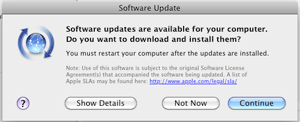
before macOS 12
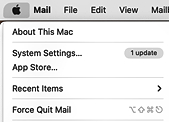
macOS 12+
Apple releases a new, free major version of macOS, usually in the Fall of each year. Major releases often add new features to the OS and to Apple application programs, and change the way users do things. Sometimes a new major release will require you to update software from other companies to work on the new OS. Applications may work differently and display differently under a new release, and users may have to change the way they do things. Menus may change; window and menu appearance my look different; functions may be given different names, consolidated, or broken into separate options. Major releases are supposed to make things better for users, once they learn the new system.
Installing a new version of the OS may require the OS Installer to make many changes to your stored files, and the install process may take hours of time before you can use your computer.
After a major release, like macOS Ventura 13.0, Apple will then make "point releases" available, like macOS Ventura 13.1, 13.2, 13.2.1, 13.3, 13.3.1, 13.4, and 13.4.1. These updates may correct problems in the previous release, or add new features, or both. See this Table of macOS releases. For more lore about Mac OS releases, see AppleInsider's article.
Apple usually provides security bug fixes for the current macOS version and a few prior versions. The OS release before Ventura, Monterey, had 12 updates from Apple as of May 2023.
When Apple produces new computer hardware versions that require new macOS support, the newest hardware needs a version of the OS that supports it. Other times, Apple removes support for old hardware from a new version of macOS, so that old machines can't run an OS newer than some version.
For example, a new version of macOS may require that the computer it runs on have certain graphic display features, and old machines can't run the latest version and use the newest OS features. (When Apple chose to use Intel chips in Macs instead of PowerPC chips, macOS provided "emulator software" that could run old software on new machines for several years' releases. When PowerPC computers were no longer supported, Apple stopped providing the emulation in subsequent versions of macOS. This same evolution is happening again as Apple's new machines use "Apple Silicon" chips instead of Intel.) Apple won't support or repair machines older than 7 years old.
Sometimes, for updates of Mac OS X, it is a good idea to wait a few days and watch the comments in online websites to see if others are having trouble; this kind of trouble may affect older computers more than recent ones. Don't rush into upgrading: often it is wise to wait for the .1 or .2 version of an OS. But do upgrade eventually; Apple stops supporting old versions with security patches after about two years. When you upgrade the major OS version, sometimes you have to upgrade some applications as well. This site has a separate page for each major release with information on how to upgrade, like this one for Ventura.
Howard Oakley has provided a page listing all Apple system updates and what they did.
Rapid Security Response Patches
Apple can send your Mac "Rapid Security Response" security patches over the Internet. Sometimes they are installed automatically (without rebooting your machine); other times you have to click something. OS bug fixes and security fixes to Safari and JavaScript are also distributed this way. When an OS release is sent out this way, your computer will show a letter suffix on the OS version, for example "macOS 13.3.1 (a)".
Apple XProtect
Apple has additional protection mechanisms built into macOS. XProtect updates are sent to your Mac silently with no notificiation. XProtect is builtin anti-virus machinery that checks any changed or new software. XProtect Remediator is built into macOS and scans your Mac for malware: see Howard Oakley's article: macOS now scans for malware whenever it gets a chance. Older versions of macOS had a subsystem called Malware Removal Tool (MRT) which has been obsoleted by XProtect Remediator.
Safe Mode
YOu can boot your computer into Safe Mode to clear cache files and run a few checks.
Installing macOS Updates
When you install a new OS version,
- check that your Mac hardware is able to run the new OS version
- check that your your installed software will run the new OS version
- save databases and configuration parameters
- do a full backup of all your files
- eject external drives and disconnect devices other than the keyboard and mouse before starting the update.
Select  ► System Settings ► General ► Software Update. It shows a window like this:
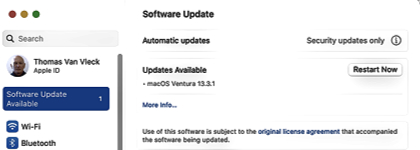
Click . Your system will be shut down and the installer will download the new software from the Internet and reboot into the installer. This may take a while, depending on how big the update is, how fast your connection is, and how many programs have to be changed. The installer will display various progress bars and estimates of time remaining (often wrong). Sometimes the installer must update the firmware on your computer and then start over with more progress bars. Almost always, it finally finishes and you can log in again; sometimes you have to press the power button to start up. When the new system version starts, it may ask a few questions. (I used to have problems, I think related to MySQL, that caused installation to hang. Pressing the power button for 15 seconds to kill the system, and pressing it again to restart, almost always caused the installation to finish successfully.)
After installing a new macOS, check ► System Settings ► General ► Software Update
to see if there are other updates to the OS or to application programs.
App Store Updates
Apple provides updates to Apple applications (like Numbers, Pages, and XCode) in the .
It shows a notification like "3 updates" in the Apple menu: you should then open ► App Store...
and select in the left sidebar.
Then click the button for each update you wish to install.
Usually it is safe to update Apple applications without any special precautions.
Device Driver Updates
When a printer or scanner manufacturer releases an update for a device driver, this software is usually made available by Apple via software update.
Often, there is a delay of weeks or months: Apple seems to batch such updates.
If you have a device already installed, ► App Store... ► Updates should notice it and update your driver.
If you buy a new device, plug it into your machine and then add it in ► System Settings... ► Printers & Scanners,
Application upgrades
When non-Apple applications (e.g. Firefox, Chrome, Word, Photoshop) pop up an "updater" box for a minor (free) upgrade, accept it: most of these are security fixes or fix crashing problems. You can also open up applications and check for updates: sometimes by selecting the "About..." item from the application menu, or looking for something like "Check for Updates" in the "Help" menu.
If you use anti-virus software, such as ClamXAV, you must keep it and its virus definitions up to date. The bad guys keep changing their attacks, and your defenses have to be updated too. (If you use Malwarebytes, as I do, it updates itself automatically.)
Some applications release major new versions every year or so. Usually these upgrades are some fraction of the cost of the new application. Sometimes you don't need to buy them: they add features you can do without.
For applications that you rent instead of buying, like Adobe Creative Cloud and Microsoft Office, the manufacturer may send out updates to fix bugs and add features whenever it chooses, and the application packages ask you to click "Update" to install new features.