Music


2023-11-08
Your Mac can import music, store it, convert its formats, send it to other devices, and play it back. The Music program comes with the Mac and is its main tool for managing music. See the Using Music article for specific how-tos about the Music application.
Getting Music
You can buy music tracks over the Internet from Apple using the iTunes Store. (Songs purchased from iTunes Store were protected by Apple's FairPlay Digital Rights Management before 2009.)
You can buy music tracks online from Amazon; their tracks are not locked or encrypted. I have bought about 20 albums this way, and they work fine.
There are other music downloading services on the Web, such as Spotify Offline and Napster.
You can read music CDs with your Mac and store the tracks in your Music library, or read vinyl LPs or cassette tapes using an attached converter, and process them into files in storage. These tracks are not locked or encrypted. To do this you need a Mac with a CD reader, or an external CD drive, and maybe hardware to convert and connect to the Mac. See below.
Apple Music Products
Apple has multiple products that deal with music tracks. It can be confusing to find out what each one does.
-
Apple Home Sharing. This set of features enables Mac Music applications to copy tracks between different Macs' music libraries on your local network. There is also a free iPhone app called Remote that lets an iPhone find out what tracks are playing on a Mac on your local network. I use this.
-
iPhone Sync You used to manage the contents of iPhones from the iTunes application on the Mac, including copying music tracks from a Mac to an iPhone. Starting with macOS Catalina in 2019, management of iPhones was moved to the macOS Finder. I use this. My iPhone can play my music for me without any external data connection.
-
iCloud. You get a free iCloud account with your AppleID, with 5GB of storage. You can pay monthly for more. Apparently, to use this storage for music tracks, you have to pay for an Apple Music account. Your iCloud storage can be used for other things besides music, such as photos and backup.
-
Apple Music. This is a music-track-sales product integrated into the Music apps on Mac and iPhone. You can buy music tracks and albums from the Web store that are loaded onto your devices and/or your iCloud account. These tracks are usable only on one computer unless you pay extra for "unlocked" tracks. This is sometimes referred to as the iTunes Store. It uses a credit card you gave Apple when you set up the account (and beware, hackers are trying to get into it).
I have not bought any music from the iTunes Store because of this Digital Rights Management (DRM) encryption, because if some accident erases my crypto keys, or Apple changes its rules, or I become unable to pay, all the music I bought this way could become inaccessible. Apple Music costs $10.99 per month for the privilege of buying tracks from apple and keeping them locked up.
-
iTunes Match. This product lets a Mac upload music tracks from its iTunes/Music library to Apple iCloud servers. It costs $25/year. Itunes Match stores your whole music library, including music from CDs and Amazon, in iCloud, for use by all your Apple devices, as long as they have access to "the cloud." If your Mac breaks down or is lost, you can still access all your music in the cloud. (No music if your device is not connected to Wi-Fi or cellular data.) Haven't tried this.
-
iCloud Family Sharing. This product allows up to 6 people to be treated as a "family" with one person as "leader." See the iCloud article section on Family Sharing. Haven't tried this.
-
There may be other Apple products dealing with music tracks.
Apple Music with iCloud
Apple Music can connect the music library on your Mac to your iCloud account, and then all of your Apple Macs, iPhones, etc. can access your music library, and if your Mac breaks down or is lost, you can still access all your music in the cloud.
When I started using my iCloud account for Photos, I tried to find a way to do the same thing with Music: store my tracks in the cloud. I have thousands of music song tracks in Music.app on my Mac. In a web browser, I logged into iCloud.com, hoping I could upload my tracks. Because I have not turned on Apple Music, there is no upload button presented in the web interface.
Apple Articles
Importing Music From Your LPs and Tapes to the Mac
Suppose you have a bunch of music on vinyl records or cassette tapes, and you want to digitize it and be able to listen to it on the Mac, iPod, etc.
You can pay to have this conversion done. I used cassettes2cds.com, now called  Reclaim Media, to convert 43 cassette tapes to CDs.
They did a fine job. They also do LPs and I may try this out.
Reclaim Media, to convert 43 cassette tapes to CDs.
They did a fine job. They also do LPs and I may try this out.
It is perfectly legal (in the US) to make a backup copy of media you have purchased. (Selling copies would not be legal.)
If you want to do it yourself, I found a good article by Matt Neuburg on TidBits.com that explains the basic steps.
To do the analog to digital conversion, you want a hardware box that attaches to your Mac: the built-in conversion in Macs and PCs is "poor."
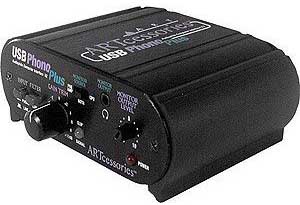
I bought an ARTcessories USB Phono Plus v2 and connected it between my turntable and a Mac Mini.
On the Mini I use the free software Audacity to capture the USB audio stream from my old B+O turntable,
clean up the data (removing clicks and surface noise), and split the input into separate MP3 files I can put into Music.
(I use the Silence Finder plugin, delete spurious markers, and then type in the track name and artist for each track.)
This can be time consuming, since I have to convert the audio at regular speed, and then the post processing and track name input takes more time.
Audacity is quirky to use but adequate for my purpose, since the old records I am converting were not super high fidelity to begin with.
It takes me about 2 hours per record, though I can multi-task while the record is playing.
(Audacity 3.2.4 works OK with Ventura 13.2.1 for me.)
Once the music is in Music I can listen to it on the Mac, or burn MP3 CDs for the car, or burn audio format CDs for portable players.
Copying Tracks From One Mac to Another
If you have two Macs, and one has music tracks that you want to copy to the other one, you can do this using Home Sharing. See the instructions in the Using Music page.
Syncing Tracks From a Mac to an iPhone
Every iPhone has a Mac that is used to manage it. If you plug the iPhone into a different Mac, you will get an alert. On the correct Mac, you can manage the contents of the iPhone. (This used to be done in iTunes but was moved to the Finder in macOS Catalina.)
You sync entire playlists from the Mac to the phone. In the iTunes or Music app, define a playlist that includes the tracks you wish to have on your iPhone.
Connect the phone to the Mac with a USB cable.
Depending on the OS that the Mac is using:
- Pre macOS 10.15 Catalina: In iTunes, display the left sidebar if it is not displaying. There will be an icon for the phone. Click it.
- Catalina and subsequent versions of macOS: Open Finder. There will be an icon for the phone. Click it.
Either way, you will see a control panel for phone syncing. The sync process will back up your phone settings to your Mac first.. you can choose how. Then, you will choose what files from your Mac will be synced to the phone. For this example, we will show syncing just music tracks:
- Click Music.
- Click sync music onto xxx iPhone.
- Click sync: "selected artists ..." or "entire music library"
- Click playlists and choose the playlist you defined
- Click sync
- Wait till done.
- Unplug the phone.
On the iPhone, open the Music/Itunes app. Select Library and Downloaded, and your playlist should be there with synchronized contents.