Big TV


2023-12-11
Summary

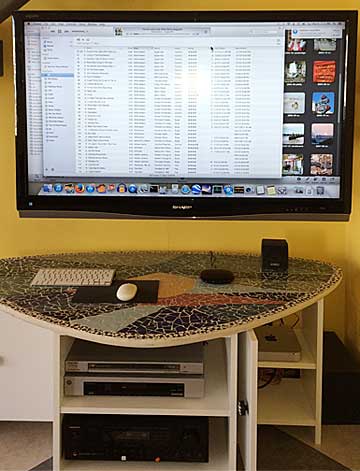
I use a Mac Mini in the living room for audio, video, and web browsing. It is connected to the TV and the stereo. The Mini's Music music collection replaced our CD shuffle player from the 90s. I currently have about 11,000 music tracks (over 1300 albums) in Music: usually I let the Mini pick songs at random. The Mini's screen saver is set to show photos at random from Photos from about 14,000 pictures.
Television
A Mac Mini can drive a high-definition TV easily. The highest screen resolution of HD TVs is 1920 x 1080 pixels. The Mac supports "1080p" resolution or higher. I chose a TV that would display true 1080p in "dot for dot" mode over an HDMI input. Sony and Sharp make models that will work. The best screen size depends on viewing distance: you have to sit pretty far back from a really big TV. LCD seems like the best bet: plasma TVs are cheaper but have problems with burn-in and get dimmer after a few years. Look for fast response (which cuts down on ghosting).
Our TV is a Sharp LC46D64U, 46 inch. Bought in 2008. Pretty old by now.
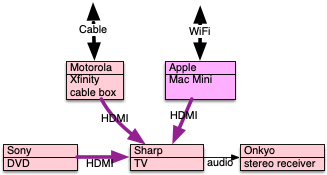
The TV has three HDMI inputs: the Mini, a DVD player, and a cable box. Each HDMI input carries video and audio. The TV sends audio output to a stereo receiver that runs our speakers.
You can use "4K" or "UHD" TVs with a modern Mac. There are some cosiderations, search Google for the latest. Look for HDMI 2.0, "4:4:4" chroma, dark blacks.
Computer
Our computer is an Intel Mac Mini, bought in 2012, replacing an older Mini. It is currently running OS X 10.13.6 (High Sierra). It can't run versions of MacOS later than that. It came with 8GB of memory and a 750GB hard drive.
The Mini is connected to the TV with an HDMI cable. The TV is configured to show the computer's output in "dot for dot" mode.
The Mini's audio output is connected to the stereo receiver with a standard miniplug to RCA audio cable.
The Mini has a wired mouse and a wired keyboard (a wireless keyboard kept disconnecting, wireless mouse kept needing batteries).
The Mini's built-in Wi-Fi connects to our AirPort base station on our local network, so it has access to the Internet, and I can surf the web, stream movies, do client presentations, etc. from the couch. Other Macs in the house can connect to its file system and move files to and from the Mini. I set up ssh keys so that I can execute Terminal commands on the Mini using ssh from a local computer. The other Macs can also start Screen Sharing and see the Mini's screen, drive its mouse cursor, and type into applications.
The Mini is set up as follows:
- A non-admin user named "AV" is set up.
- AV's screen saver selects from a Photos album called "screen".
- I use a different user ID for backup and maintenance, and back up the hard drive monthly.
I have not installed much Non-Apple software on the Mini: just Firefox, Chrome, Emacs, Audacity.
Pictures
I add picture files to Photos using the Import function. I use the full resolution versions of these pictures and let Photos downscale them, rather than trying to shrink them to the screen resolution. I adjust each picture to make it look good on the TV, cropping it to 16:9 (HDTV proportions) if possible in order to avoid black bars on the sides, and adjusting the exposure, saturation, noise, definition, and sharpness.
To view pictures, I use the remote to switch the TV's input to the Mini and let the screensaver kick in. If I want to see a particular set of pictures, I can cause Photos to display a slide show from an album.
I have turned on iCloud Photo Sync so the Mini's Photos database is backed up in iCloud, and I can add and enhance pictures from Macs on the same iCloud account.
Music
I add music tracks to Music by ripping CDs or vinyl, or by buying music online. I have imported over 11,000 tracks into Music (used to be called iTunes). I defined several playlists with different groups of music tracks. To play music at random, I set up a playlist of chosen songs, click in Music, and then activate the "shuffle" icon.
The Apple Remote app on an iPhone or iPad will cause Music to skip to a new song, list what's playing, change volume, etc. -- when it works. (The iPhone or iPad must be on the same wireless network as the Mac running Music.)
I found a  good article by Matt Neuburg on TidBits.com that explains the basic steps to import music from vinyl LPs.
I use the Mini to record audio from my old turntable,
using an ARTCessories USB Phono Plus v2 preamp box to convert analog to digital and send it to the Mac via USB.
On the Mini I use the free software Audacity to capture the audio stream,
clean up the data, and create MP3 files I can put into Music. El Capitan's built-in audio driver works fine.
good article by Matt Neuburg on TidBits.com that explains the basic steps to import music from vinyl LPs.
I use the Mini to record audio from my old turntable,
using an ARTCessories USB Phono Plus v2 preamp box to convert analog to digital and send it to the Mac via USB.
On the Mini I use the free software Audacity to capture the audio stream,
clean up the data, and create MP3 files I can put into Music. El Capitan's built-in audio driver works fine.
(I do not sync my iTunes tracks to my iCloud account. My understanding is that if I did this, Apple would replace my tracks with hig-res tracks from the Apple Music library, with DRM protection that could make them unusable if the keys were revoked.)
Movies
I bought an "upscaling" (progressive scan) DVD/Blu-ray player (Sony). These are not expensive, and DVDs look very good. The DVD player has "Apps" including access to Netflix and Amazon Prime Video, connecting via Wi-Fi, but I haven't used them.
The Mac could work as a DVD player using an Apple external optical drive. This mode doesn't seem to be as sharp as the upscaling dedicated DVD player though. It would be possible to copy the content of a DVD to the hard drive, but unless you crack the copy protection, it won't play. (Haven't tried this.)
We stream movies onto the big TV, using the app built into the cable box, or an app on the DVD player, or a web browser on the Mini. We get video content from
- Netflix
- Amazon Prime
- Metropolitan Opera
- Peacock
TV Content
We started with Comcast cable in the 90s. When I bought the HDTV, I upgraded Comcast to HD cable: Comcast swapped the boxes and charged us a few dollars extra per month. The packages available were either very expensive with lots of channels we never watched, or less expensive but with only a few channels. (Where we live, there's only one cable TV provider, and nothing over the air.)
For a while we eliminated our land line phone and had an Xfinity "triple play" package from Comcast.
Sling TV
I signed up for a trial subscription to Sling TV. I installed an application on the Mac that gave us over 20 channels, including ESPN and TBS for sports, and several movie channels including IFC and Sundance. We didn't continue with Sling when the trial ran out. Some of the issues we had were:
- The picture wasn't as sharp as HD television.. seemed to be 480p. (This is an Apple limitation, see below.)
- The Sling application didn't show Macintosh full screen video.
- Navigation was confusing and non-intuitive.
- Many of the channels had content we weren't interested in, such as various series, History channel, kids channels.
- The movies were loaded with commercials.
- Error messages were vague and cryptic, when there were any. Viewing was sometimes interrupted by mysterious blanks and halts. There was no way to tell whether this was a problem with the cable connection or the Sling service.
YouTube TV
(Dec 2017) YouTube TV was announced about November 2017, as a service that would provide a group of live TV channels, including broadcast channels, sports, and movies, via streaming over the Internet. I tried it out and was disappointed.
All TV channels were at most 480p. That is, not HD: fuzzy. Not what I expected. It turns out that Apple has not published the interfaces that would enable showing HD content to external monitors. They keep these for themselves. (This probably explains why Sling TV was unsatisfactory on my Mini.)
Apple TV (app)
I bought a new phone, and it came with a free year's suscription to the "Apple TV" service (which is different from the "AppleTV" box). So I signed up. It is worth what I paid for it, i.e. nothing. Paying $10/month for the privilege of paying to rent movies from Apple is a bad deal. I tried to use my subscription to see one movie, paid $9 or so to see JoJo Rabbit. Well, who wants to look at a movie on an iPhone? So I tried to cast it to my Mac Mini. Won't do that, error message basically says "won't do that." Maybe the OS is too old. Unfortunately none of my computers were running Catalina then (and the Mini was too old to try), so I couldn't use Apple TV for anything.
Other TV Streaming
Don't bother with pirate web sites that promise to stream sports events and movies, ignoring US copyrght restrictions. Some of them demand that you disable ad blockers, and then blast your browser with pop-up windows that are hard to get rid of, advertising gambling and fantasy football sites. Other pirate sites will tell you your Flash plugin needs to be updated, and if you click on their buttons, install malware. Sites vanish when enforcement actions take them down; often they reappear with slightly different names.
Things I have Not Tried Yet
Apple TV (device)
An AppleTV (I haven't tried one) will do more or less the same as the Mini setup described above. It also "lets" you subscribe to a lot of streaming services, some requiring additional fees. An AppleTV connects via Wi-Fi to your home router and to other Macs on your network. It will show your pictures stored in iCloud or in the Music library of a computer on your network. The AppleTV will store 1000 photos, in case your router can't connect to the Internet.
There were rumors that Apple would sell a TV service package in 2016 that included about 25 channels, including broadcast channels and live sports. This didn't happen. But YouTube TV became available on the Apple TV in Feb 2018, doing exactly that.
Other Streaming Services
There are other streaming video sources besides Netflix and Sling and YouTube TV, if you have a high-speed Internet connection. Roku seems to be oriented toward current popular movies and TV series. Hulu interpolates ads into its movies, even if you pay for a subscription. There is also Apple Music video streaming.
Media Center Packages
There is a port of Xbox Media Center, called Kodi, for the Mac. It seems to be oriented toward playing movies stored on the Mac, but it does have music and picture display abilities. It's free.
VLC is another music and video player for the Mac. It plays many audio and video formats. It's free.
Windows PCs
I think there are analogues for all of this on Windows PCs, but I have not investigated. I did hear that "Windows Media Center" is being discontinued by Microsoft.
Future of my Mini
My 2012 Mini is past the end of Apple support. It won't run the latest macOS. It doesn't have a T2 chip so much of its streaming is limited to 720P. There are now "4K UHD" TVs but apparently the Mini's graphcs card has problems driving them. The hard drive has been spinning for years now.. sooner or later it will die. Is it time for a new Mini? Newer Minis with Apple Silicon are much more powerful. I will save up.
Raspberry Pi
I bought an 8GB Raspberry Pi 4 computer kit and a 1TB SSD drive for about $200. It took me a couple of hours to assemble the computer and install Linux. Setting up the Pi to display pictures at random (using xscreensaver) and play songs at random took some experimentation (using omxplayer). This took a few more days.
Exporting my edited pictures from the High Sierra Photos application was difficult. Using the menu item to export all 10,000 photos in one operation caused Photos to crash. Instead, I had to to export about 700 images at a time, then quit Photos and restart it, until all were exported. While the files were exporting, a tiny little progress pie chart was shown in the top margin of the window and vanished very quickly, but the operation was not done; after a few minutes another progress pie chart appeared that went much more slowly. Each export operation took about 45 minutes for 700 files. When all photos were exported, I used rsync -avzu --blocking-io -e "ssh" screendir PI_SYSTEM:/ssd to copy them to the Pi.
I exported my Music playlists to text files and converted them to rsync scripts to move my music to the Pi. Then I wrote a tiny Perl program for the Pi to play songs at random.
Tne Linux analogues of Photos and Music don't have the slick user interfaces as the Mac applications. .. but I won't miss Apple's capricious redesigns and buggy implementations of the last 10 years.
Smart TV: ROKU
In 2020 we bought a 32 inch TV, TCL ROKU Smart LED, cost about $160. It had built in access to Netflix and Amazon Prime, and we also used it as a second Mac monitor.
In 2022, Roku announced version 11 of its TV OS, and some months later I was able to update the OS on the TV. This added the ability to play music steamed from a Mac or iPhone over AirPlay. (Unfortunately, my Mac Mini is stuck on High Sierra, which is too old to stream audio over AirPlay. Works from my iPhone though.) The new Roku OS also added Photo Streams, a way to show personal photos in a screen saver. How this works is
- On the Web, visit https://photostreams.roku.com/streams
- On that page, log into your Roku account. (Create one if necessary.)
- You can now "create a photo stream" and then "upload" pictures to the stream through a very clunky and slow interface.
- You can have up to 10 streams and each stream can have up to 100 pictures. (There is also a storage limit, they don't say how much.)
- On the TV remote, Select Settings >> Theme >> Screensavers, and set it to Photo Streams.
- When the TV goes idle, it will start showing photos. You can control the start delay but not the picture duration.
See https://support.roku.com/article/4421919862167. This works just fine.
Version 12 of the Roku TV OS was announced in March 2023 with "lots of features" inclduing increased numbers of pictures per photo stream.
Other Smart TVs
I think a similar screensaver approach will work with AppleTV and Google TV, but I haven't tried them. Smasung, Chromecast, and FireTV all have something like this.