Essentials


2024-02-09
Extended Warranty. If you buy a Mac, get AppleCare+, which extends the warranty from one year to three.
Essential Hardware
Besides what came in the Macintosh box, you will need some other hardware. Some places I buy equipment: Apple Online Store, Amazon.com, Other World Computing, physical Apple Store.
- External hard drive or SSD drive for Time Machine backup. Time Machine can let you restore a file to the way it was at a chosen time in the past. The easiest thing is just to buy an inexpensive drive to back up each computer.
- External hard drive or SSD drive for full-clone backup of your computer. This is useful in addition to Time Machine.
- Printer. The ink for ink-jet printrs is expensive. I have had good laser printers from Brother.
- A few USB Flash memory sticks. A 16GB stick is less than $10.
- Internet connection from an Internet Service Provider (ISP). Where we live, cable is a better deal than DSL.
- Hardware firewall/router. (I use a TP-Link Deco system.) If you use wired Ethernet, you may need an Apple Thunderbolt to Gigabit Ethernet Adapter ($29).
- External display adapter if you want to hook your machine to a TV or second monitor, or connect your laptop to a projector.
- A desktop UPS may keep non-laptop machines, cable modem, and backup drive running if the power should flicker. I got mine from Amazon Basics and it has works fine.
-
Macs don't come with a CD/DVD drive any more. These drives are useful for backing up your storage to CD-ROM or DVD-ROM discs. Such discs are write-once and should last for a long time. Buy the Apple external Superdrive (which connects via a USB-A port), and a spindle of blank DVD-Rs (or DVD+R DL) for backup. Use CD-Rs for file interchange and music. Note the minus-R. You may also want a
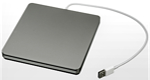
 Laser lens cleaner to fight dust and dog hair.
(You cannot connect this drive to a MacBook through some USB-C hubs: I got an alert that the drive required power.
Connecting the SuperDrive to my Mac's port via a USB-A to USB-C adapter cable worked.)
Laser lens cleaner to fight dust and dog hair.
(You cannot connect this drive to a MacBook through some USB-C hubs: I got an alert that the drive required power.
Connecting the SuperDrive to my Mac's port via a USB-A to USB-C adapter cable worked.)
-
Documenting your setup will help you manage your macines.
One way is to keep a Lab Notebook or similar, for each computer.
Write your name on it, record your serial number, model number, date purchased,
and write down "how to" scripts and notes for the tasks you use the computer for.
For example,
- How you back up your files on your computer.
- How your home network is connected.
- Software you have installed, with date and time, and date and time of updates.
- Where you keep useful files on your computer.
- How to copy a photo to a USB drive for printing.
- How to import a photo to your Mac.
- How to add music to your Music library.
- etc
If you have a laptop, you probably want a bag for it: I have liked bags by be.ez and STM. Amazon has some basic laptop bags that are less expensive. I use a cheap USB mouse with my laptop. (Wireless mice need new AA batteries every couple of weeks; you can use rechargeable batteries and a charger.)
Docks, Ports, and Devices
Tne new m1 and m2 MacBooks provide only USB-C sockets.
A nice TidBITS article by Glenn Fleishman explains USB-C, Thunderbolt 3, and other protocols.
You can buy individual adapters from Apple to connect all kinds of devices to the USB-C sockets, such as Ethernet connections, USB-A devices, SD card readers, and Thunderbolt 2 drives. For example, Apple sells this thunderbolt-2 adapter for $49. You can also get official Apple adapters for USB-C to VGA video, HDMI video, Lightning cables for iPhone Apple Watch chargers, headphone jacks, SD card readers, and so on. This can get costly.
You may have more peripherals than sockets: MacBook Airs have only 2 USB-C sockets, and Macbook Pros have 3. I use a "dock" that connects to one USB-C socket on tme Mac and provides sockets for plugging in 12 simultaneous devices. I use a NewQ dock that turns one USB-c connection into 12, and supports dual monitors. Costs about $49. (There is a similar product that comes with an external power supply, costs more.)
Docks like this are great, but they don't work for every case. I connected an Apple CD/DVD SuperDrive to my dock's USB-A socket, and macOS popped up a warning that the device "needs power" and instructed me to connect it to a port on my computer. I had to use a USB-C to USB-A adapter cable to get the drive to work.
For traveling, I use a smaller dock from Plugable. It costs $39 and supports 7 simultaneous connections.
Essential Settings
Visit everything in System Settings and set these items, and make a page in your notebook for settings you made.
 ► System Settings ► General ► About: Set the network name of your computer
- ► System Settings ► General ► Software Updates: Security updates only
- ► System Settings ► General ► AirDrop & Handoff: Handoff OFF; AirDrop Contacts only
- ► System Settings ► General ► Login Items: Allow Malwarebytes in background
- ► System Settings ► General ► Sharing: OFF unless you are an expert
- ► System Settings ► Lock Screen: Show mesage when locked: set your name and phone
- ► System Settings ► Internet Accounts ► iCloud>Find My Mac: ON (see Loss Protection)
- ► System Settings ► Privacy & Security ► Security>FileVault: ON (see Security)
- ► System Settings ► iCloud ► Sync This Mac: ON (see Backup)
- ► System Settings ► iCloud ► iCloud+ ► Desktop & Documents: ON
Essential Software
Free
There is a lot of free software available for the Mac. Some of it is more trouble than it is worth. Be conservative. Here are a few that I use.
-
Firefox or Chrome web browser.
Use one of these instead of Safari; bugs are usually fixed more quickly.
-
Firefox add-on: uBlock Origin, which blocks a lot of ads -- some of which may be infected with malware.
Maybe you want NoScript too.
Chrome has similar add-ons.
- Google Earth for map exploration.
- Stellarium Planetarium.
- Audacity audio editor.
- Malwarebytes free anti-virus checker.
- Aquamacs text editor. A Mac-friendly Emacs.
Installing Malwarebytes: you need not buy a subscription; the basic Malwarebytes app will work for free. Occasinoally it will pop up an alert like "Security Advisor: you have unresolved securty actions. Click to improve your protection." to try to upsell you. You need not click this, or buy anything. The free version od Malwarebytes will run once a day, or when you click "Start Scan."
Comes with the Mac
- Music does a lot of stuff: manages music; imports and burns CDs; sells you music. (Used to be called iTunes, and also handled podcasts, Videos, and iPhone management; these functions are now in other apps.)
- Photos is a reasonable photo organizer and can do some picture correction. (Used to be called iPhoto.)
- Music, Mail, Contacts, Finder, and Calendar are essential to most users. Additional applications included with OS X may be important to your specific needs.
Commercial
These cost money. Worth it.
-
SuperDuper or Carbon Copy Cloner.
Use one of these to back up your entire main storage to a backup volume.
-
Microsoft Office 2023 (about $150/computer, or $100/year subscription).
People mail you MS Word attachments often (of course a lot of these are jokes and chain letters).
You can try to use Libre Office for the Mac, which is free, and can read Word, Excel, and PowerPoint files,
but the formatting may be screwed up and not all Office features are supported.
Someone mailed me a .doc file that Word 2011 would not open: it said the file was "corrupt."
Turns out the file was written with LibreOffice, and had footnotes.
If you want to be able to create files that other people can read with Word, PowerPoint, or Excel, get the Microsoft product.
-
Adobe Photoshop if you want to do serious photo work.
(Adobe doesn't sell its products any more: they rent them for $20/mo/product.
If this is too expensive for you, Adobe Photoshop Elements is good for light work, costs $79, and is included with some cameras and scanners.)
Look into Affinity Photo as an alternative to Photoshop, about $50,
and Affinity Designer as an alternative to Illustrator, about $50.
Another Photoshop alternative is Pixelmator, about $30.
GIMP is also a free alternative to Photoshop.
- Quicken or some equivalent if you want to manage your checkbook. Quicken went subscription in 2018. I switched to Banktivity. It went subscription in 2021. Now I am looking at GNU Cash. I really hate this.
- Turbo Tax or some equivalent if you want to do your taxes every year.
Essential Web sites
Here are some web sites I use often. Some require signup or accounts. You can add shortcuts to your favorites to your browser's bookmarks bar.
- MacInTouch - Macintosh news: www.macintouch.com
- Google maps: maps.google.com
- Amazon: www.amazon.com
- Gmail - free mail account: www.gmail.com (plenty of storage, good spam filtering)
- NOAA weather: forecast.weather.gov
- LinkedIn - social networking: www.linkedin.com
- World news, local newspapers
- Airline and travel sites
Essential Tips for Mac Users
OSX Daily has a nice article with essential tips for new Mac users.